The average HubSpot instance has 18 or more saved reports. Most revenue teams use three of them for board meetings and cannot explain how the rest were built. TPG has spent 19 years fixing reporting architectures across hundreds of HubSpot environments. We configure dashboards that connect marketing activity to revenue outcomes, replace gut-feel forecasting with accurate pipeline data, and give every leader the specific view they need to make better decisions.
By the Numbers
| 18+ | Average saved reports in a HubSpot instance at the time of TPG engagement |
| 3 | Reports actually used for board-level decisions before TPG engagement |
| 4-8 weeks | Time to deploy a full four-dashboard reporting architecture |
| 30-50% | Improvement in attribution accuracy after proper campaign tagging and model configuration |
The Problem
Marketing and Sales Report Different Pipeline Numbers Every Week
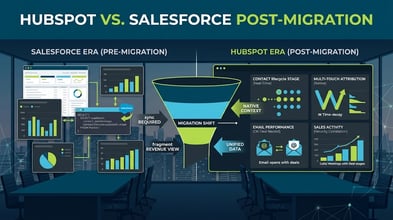
HubSpot says $2.4M in pipeline. Salesforce says $1.9M. The board meeting becomes a reconciliation exercise instead of a strategy conversation. The gap exists because deals are created in one system and not synced correctly, or because pipeline definitions differ between teams. Every week spent explaining the gap is a week not spent closing it.
Your Attribution Model Was Never Configured
HubSpot installs last-touch attribution by default. Last-touch attribution credits the final form fill before a deal closes, which typically means your paid campaigns look like they drive more revenue than your content programs, even when content influenced every stage of the deal. Teams running multi-channel programs without a configured attribution model are making budget decisions based on wrong data.
The CMO Cannot Answer "What Is Our CAC?" Using HubSpot Data
Customer acquisition cost requires clean marketing spend data, accurate contact-to-customer conversion tracking, and a defined time window. When lifecycle stage automation is broken and campaign costs are not logged in HubSpot, the CMO calculates CAC in a spreadsheet from memory. That is not acceptable for a $50M+ company in 2026.
Reports Are Built on the Wrong Object
The majority of mis-configured HubSpot reports pull contact data when the business question requires deal data, or pull deal data when the answer requires an attribution model running across contacts, deals, and campaigns simultaneously. Building reports on the wrong object produces numbers that look plausible but answer a slightly different question than the one being asked.
Our Approach
Phase 01: Current State Audit (Weeks 1-2)
We review every saved report and dashboard in your HubSpot instance. We document what data exists, what is missing, and what is structurally broken. We audit lifecycle stage automation, campaign object setup, UTM tagging consistency, and deal stage configuration. The audit produces a gap analysis and a prioritized report architecture plan.
Typical audit findings include: lifecycle stage automation missing for 3+ stages, UTM parameters not captured in HubSpot contact or deal properties, attribution model set to default last-touch and never changed, and custom report objects not configured despite HubSpot tier supporting them.
Phase 02: Report Architecture and Dashboard Design (Weeks 2-4)
We design the four core dashboards and define the reports within each. Every report is documented before it is built: what question it answers, which object it uses, which filters apply, and who uses it. We validate the data requirements for each report and identify any HubSpot configuration changes needed to support them (lifecycle stage automation, campaign tagging, deal field additions).
We build the attribution model architecture during this phase: selecting the right model for your buying cycle, configuring campaign UTM taxonomy, and setting up the campaign objects that attribution reporting requires.
Phase 03: Build, Validate, and Train (Weeks 4-8)
We build every report and dashboard in HubSpot. Each report is validated against source data before it goes live. Pipeline reports are cross-checked against actual deal records. Attribution data is tested against known closed-won customers to confirm revenue is being attributed to the correct campaigns. We run two validation sessions with your team before handoff.
Training covers: how to read each dashboard, how to add new reports, how to update campaign objects for new programs, and how to identify when a report may have a data quality issue. Every team that uses the dashboards gets a 30-minute walkthrough specific to their view.
What's Included
- Full HubSpot reporting and dashboard audit with gap analysis document
- Executive dashboard: revenue, CAC, pipeline coverage, and MQL-to-Customer funnel
- Marketing dashboard: campaign performance, attribution by channel, MQL volume and velocity
- Sales dashboard: pipeline by stage, weighted forecast, stage conversion by rep, deal age alerts
- Customer success dashboard: retention rate, expansion revenue, NPS trend, at-risk accounts
- Attribution model configuration: model selection, campaign object setup, UTM taxonomy documentation
- Custom report objects configuration (if HubSpot tier supports)
- Lifecycle stage automation audit and correction
- Campaign tagging standard and implementation guide
- 60 days of post-deployment support for report adjustments and questions
- Dashboard training sessions for marketing, sales, and executive users
"Before TPG, our board deck had three slides with revenue numbers that didn't match each other. Ninety days after TPG configured our HubSpot reporting, we walked into the board meeting with one number and could explain exactly how we got there." — VP of Marketing, B2B SaaS company, $40M ARR
Who This Service Is Built For
- CMOs who cannot pull customer acquisition cost from HubSpot without a spreadsheet
- Companies where marketing and sales report different pipeline totals from different systems
- Teams running multi-channel programs without configured attribution reporting
- HubSpot instances that have 12+ months of contact and deal data but no reliable funnel conversion reports
- Revenue leaders preparing for board presentations, investor updates, or annual planning who need accurate marketing-to-revenue data
- Organizations mid-migration from Salesforce or Marketo where data exists in both systems but reporting is reconciled manually
Related Services
- HubSpot Marketing Attribution Setup — Multi-touch attribution configuration for campaign-to-revenue reporting
- HubSpot CRM Configuration and Data Cleanup — Contact, company, and deal data quality as the foundation for accurate reporting
- HubSpot Lead Scoring Implementation — MQL qualification and lifecycle stage automation that makes funnel reports meaningful
- HubSpot Pipeline Reporting and Sales Dashboard — Forecast accuracy, stage conversion, and deal velocity reporting for sales leaders
Frequently Asked Questions
How long does it take to deploy a full reporting and dashboard configuration? For a mid-market HubSpot environment with Marketing Hub Professional and Sales Hub Professional, the typical deployment timeline is 4-8 weeks. The range depends on how much data cleanup is required before reports can pull accurate data, and how many custom report objects need to be configured. We provide a specific timeline estimate after the initial audit in weeks 1-2.
Does TPG's reporting work require a specific HubSpot tier? Most of the core reporting architecture (the four dashboards, funnel reporting, pipeline reports) is available in Marketing Hub Professional and Sales Hub Professional. Multi-touch attribution reporting requires Marketing Hub Professional at minimum. Custom report builder and custom objects require higher tiers. We audit your current tier in phase 01 and flag any reports in the architecture that require a tier upgrade, so you can make that decision before we build.
What if our pipeline data lives in Salesforce, not HubSpot? We configure HubSpot reporting to use the deal and contact data that syncs from Salesforce via the HubSpot-Salesforce integration. For companies where Salesforce is the system of record, the critical step is ensuring the sync is configured correctly so that deal stage, close date, and deal amount fields in Salesforce write accurately to HubSpot deal records. We audit the sync configuration as part of phase 01.
Why don't our marketing and sales pipeline numbers match today? Usually one of three reasons: deals are created in Salesforce without syncing to HubSpot, pipeline definitions differ between teams (marketing counts "open opportunities" including early-stage deals that sales does not count), or deal stage automation is missing and deals sit in wrong stages. All three are diagnosable in the audit phase. Most attribution gaps between marketing and sales reports come down to how the deal-to-contact association is configured, not a fundamental data problem.
Can you build reports that pull in data from outside HubSpot, like ad spend from Google Ads or LinkedIn? Yes. HubSpot's native integrations with Google Ads and LinkedIn Ads pass impression, click, and spend data into HubSpot campaign objects. We configure those integrations as part of the attribution setup so that cost data appears alongside conversion data in your campaign performance reports. For platforms that do not have native HubSpot integrations, we configure the data flow via HubSpot Operations Hub or a middleware connection.
The Pedowitz Group | pedowitzgroup.com | Revenue Marketing Experts Since 2007