Most marketing teams treat HubSpot contacts as a database to send to. The teams that consistently outperform treat it as an intelligence layer to activate from.
The difference is operational. One approach starts with an audience in mind and builds backward to find contacts who roughly match. The other starts with contact intelligence — what contacts have done, where they are in the journey, what signals they're showing — and builds forward to campaigns that match exactly what those signals indicate.
Activating campaigns directly from contact segments is what the second approach looks like in practice. The segment exists before the campaign brief is written. The campaign is built to serve that segment, not the other way around.
How Poor Contact Data Sabotages Nurture
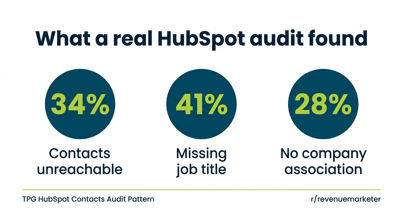
Poor contact data sabotages nurture campaigns before the first email sends. Nurture logic assumes that the contact properties used to route people into the right track are accurate. If lifecycle stage is inconsistently populated, contacts end up in the wrong nurture track. If persona is missing, every contact gets the generic version. If engagement history is incomplete, the workflow can't exclude contacts who have already converted.
The most common nurture failure pattern: a contact who requested a demo three weeks ago is still receiving mid-funnel nurture emails because lifecycle stage didn't update when the demo was booked and the nurture exclusion logic is based on lifecycle stage. The sales rep is running an active evaluation. Marketing is sending awareness content. Both teams are reaching the same prospect simultaneously with conflicting messages.
This is a data governance problem that breaks the campaign. Not a campaign design problem.
Workflows Triggered by Contact Properties
Workflows triggered by contact properties are how HubSpot translates contact intelligence into automated, timely action. A contact does something. A property changes. A workflow fires. Something relevant happens automatically.
A workflow that fires when a contact's job title updates to a VP-level title and the company is in a target industry and lifecycle stage is Lead can immediately re-score the contact, notify the territory rep, and enroll them in an executive nurture sequence. All three things happen in real time without manual intervention. The workflow is only as smart as the data it reads.
Contact Behavior and Retargeting Audiences
Connecting contact behavior to retargeting audiences closes one of the most common gaps between CRM intelligence and paid media execution.
You know which contacts visited the pricing page last week. You know which ones downloaded the competitive comparison guide. HubSpot can sync these behavioral segments to LinkedIn and Google as custom audiences, so retargeting campaigns reach exactly the people showing the most relevant signals, not a broad demographic approximation. Paid media performance improves significantly when retargeting is built on behavioral contact segments rather than site visitor cookies alone.
SDR Outreach and Contact Engagement Alignment
Aligning SDR outreach with contact engagement improves ROI because it changes when and why an SDR reaches out. A workflow that detects high-intent behaviors — visiting pricing pages twice in 48 hours, engaging with three product-specific content pieces in a week — and immediately creates a task for the territory SDR ensures outreach happens at the moment of peak interest. Response rates on behavior-triggered outreach are consistently higher than time-triggered sequences.
Frequently Asked Questions
What is contact-based campaign activation in HubSpot? Contact-based campaign activation means building campaign audiences from existing contact intelligence in HubSpot — properties, behaviors, lifecycle stages, and engagement scores — rather than building lists manually for each campaign. It requires pre-built smart list segments and clean contact data but produces faster campaign launches and more relevant audience targeting.
How do HubSpot workflows use contact properties to automate campaigns? Workflows trigger on any contact property change, contact activity, or combination of conditions. When triggered, a workflow can enroll the contact in an email sequence, notify a sales rep, update contact properties, or add and remove contacts from lists. The more complete and accurate the contact properties, the more precisely workflows target the right contacts at the right time.
How do you connect HubSpot contact segments to LinkedIn and Google ad audiences? HubSpot's Ads tool syncs contact lists and smart lists to LinkedIn Matched Audiences and Google Customer Match. HubSpot updates audiences automatically as contacts enter or exit smart lists. This means ad targeting always reflects the current state of HubSpot segments without manual audience uploads.
What is behavior-triggered SDR outreach and how does it work in HubSpot? Behavior-triggered SDR outreach uses HubSpot workflows to detect high-intent contact behaviors and automatically create a task or sequence enrollment for the assigned SDR. The outreach happens at the moment the prospect is showing the highest intent rather than on an arbitrary time-based cadence.
How does poor contact data affect marketing automation performance? Marketing automation in HubSpot is only as effective as the data it reads. Workflows built on properties that are inconsistently populated fire inconsistently. Nurture sequences built on lifecycle stages that aren't correctly maintained route contacts to the wrong tracks. The most common reason marketing automation underperforms is not workflow design — it's the quality of the contact properties the automation depends on.