How Does HubSpot’s Loop Integrate with the HubSpot CRM Platform?
Signals in, actions out. Loop connects to CRM objects, properties, workflows, and datasets so customer behavior automatically drives sales, service, and revenue outcomes.
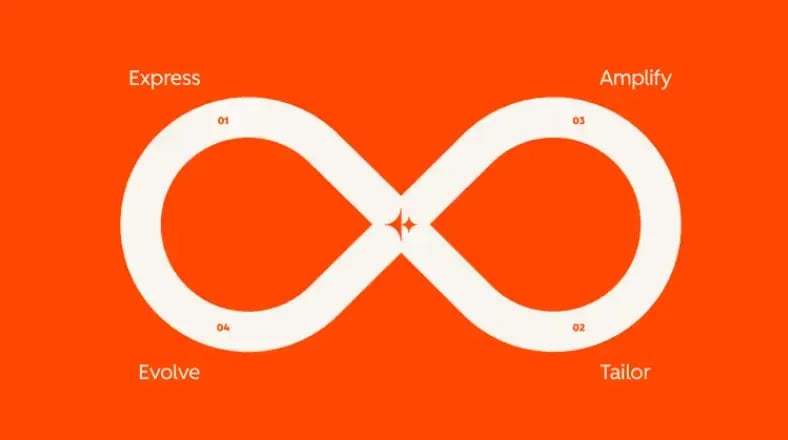
HubSpot’s Loop integrates directly with CRM by mapping each stage to native objects and automation: Express templatizes content and taxonomies; Tailor uses first-party properties, lists, and dynamic content; Amplify distributes across channels and enables Sales/Service via sequences and playbooks; Evolve measures in Reports/Datasets and promotes winners to templates. Workflows turn signals on Contacts/Companies/Deals/Tickets/Subscriptions into actions.
What “Integration with CRM” Looks Like in Practice
Loop Stages Mapped to CRM Objects, Automations, and KPIs
| Loop Stage | Primary CRM Objects | Signals Tracked | Automations / Actions | Key KPIs |
|---|---|---|---|---|
| Express | Content (CMS), Campaigns, Properties | Template usage, content releases | Govern naming/UTMs; auto-tag assets; publish templates/snippets | Content speed; brand compliance % |
| Tailor | Contacts, Companies, Custom objects | Form data, intent, role, industry | Lists & dynamic content; account/role routing; enrich & dedupe | Engagement lift; MQL→SQL accept rate |
| Amplify | Deals, Calls/Meetings, Quotes, Subscriptions | Sequence engagement, quote views, stakeholders added | Enroll sequences; create mutual plans; send quotes & pay links | Channel CVR; assisted pipeline; stage conversion |
| Evolve | Reports, Datasets, Tickets (feedback) | A/B results, NPS/CSAT, cohort trends | Promote winners to templates; update playbooks; adjust SLAs | Velocity lift; win rate; retention/expansion |
How the Loop Writes to and Reads from CRM
Start by aligning the data model: lifecycle and pipeline stages, required properties, and a campaign taxonomy. Express converts brand rules into page/email templates and snippets so assets are consistent and properly tagged—critical for accurate reporting.
Tailor turns first-party data into relevance. Lists, custom properties, and dynamic content personalize experiences while workflows route accounts to owners with SLA timers. In Amplify, the same signals enroll targets into sequences, generate quotes, start subscriptions, and create tasks/playbooks for Sales and Service.
Finally, Evolve closes the loop. Experiments and service feedback feed Datasets and dashboards; winners are promoted to default templates and playbooks. A Loop scorecard ties engagement, conversion, velocity, win rate, and retention to specific plays—so funding follows what works.