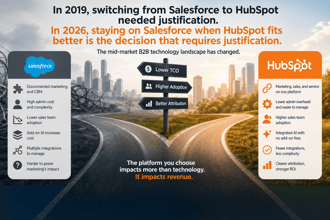
TPG has completed more than 100 Salesforce to HubSpot migrations for mid-market B2B companies. In almost every case, the company bought Salesforce because they thought they needed enterprise-grade infrastructure. They left because they couldn't get their sales team to use it, couldn't get their marketing team to trust the attribution data, and couldn't justify the $80,000 to $150,000 per year they were paying in admin costs alone.
These are not isolated cases. This is a pattern.
The Actual Reasons Companies Leave Salesforce
Reason 1: The Salesforce Admin Cost Nobody Planned For
When mid-market companies buy Salesforce, they budget for licenses. They don't budget for a Salesforce admin. But an unmaintained Salesforce instance degrades within six months. Custom fields stop being used correctly. Workflows break and nobody knows why. Reports show numbers that don't match what the sales team reports manually. Integrations lose sync and produce duplicate records.
The solution is a dedicated Salesforce admin. At mid-market scale, that is a $80,000 to $150,000 per year salary, plus benefits. That is before you add the cost of a Salesforce developer for anything requiring Apex code, which in a moderately customized instance is most substantive changes.
Companies making $20 million to $80 million in revenue routinely spend $250,000 or more per year on Salesforce total cost. When they calculate what that same investment covers in HubSpot, including a HubSpot partner for ongoing support, the economics are not close.
Reason 2: Sales Adoption Never Reached 60%
Low adoption is the symptom. The cause is that Salesforce's interface is optimized for admins, not reps. Reps who were trained on Salesforce during a rollout three years ago and never received ongoing training are logging activity in the fields that are easy to find, ignoring the fields that require navigation, and bypassing required fields with placeholder values.
The result is a CRM that has data but not the right data. Pipeline reports reflect what reps entered, not what is actually true about the deals. Leadership makes decisions on data they know is wrong because they have no alternative.
"Our CMO called HubSpot 'Salesforce for people who actually use their CRM.' She wasn't wrong. Within 60 days of launch, our active usage rate doubled." — VP of Marketing, Series C B2B Software Company
When companies switch to HubSpot, they commonly see active CRM adoption jump from 40 to 50% in Salesforce to 75 to 85% in HubSpot within 90 days of go-live. The interface difference is real and it matters.
Reason 3: Marketing Attribution Was Never Reliable
Salesforce and marketing automation platforms (Marketo, Pardot, HubSpot Marketing Hub) require careful integration to produce reliable multi-touch attribution. In most mid-market implementations, that integration is either never built correctly or degrades over time as team members change and configurations drift.
The result is that marketing cannot prove pipeline influence. Leads created through marketing programs don't have reliable source data. Multi-touch attribution reports don't run cleanly because the contact-to-deal association logic is broken. Marketing leadership cannot answer the board question: which programs produced revenue?
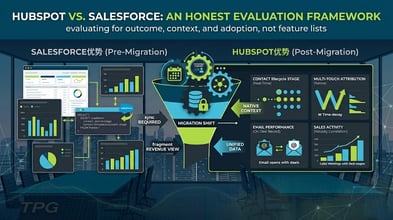
When companies move to HubSpot with both CRM and Marketing Hub, the attribution problem largely disappears. Contact engagement history and deal association live in the same database. Attribution reports pull directly from that data without requiring a sync between two separate systems. Marketing teams that spent years unable to show pipeline influence can demonstrate it within weeks of a properly configured HubSpot setup.
Reason 4: HubSpot's AI Is Now Genuinely Useful
This is the newest reason and it is accelerating the migration decision for companies that were otherwise on the fence. HubSpot's Breeze platform in 2026 includes AI tools that reps actually use without training: email drafting from a contact record, deal summaries from engagement history, AI-enriched contact data, and autonomous prospecting sequences.
Salesforce has Einstein and Agentforce, but at mid-market scale, those tools require Salesforce admin configuration and often additional licensing. The practical AI advantage for mid-market companies is with HubSpot, where the tools are embedded in the product at tiers that mid-market companies can afford, and they work out of the box.
The Three Switch-Trigger Moments
Most companies don't switch after a gradual dissatisfaction. They switch after a specific event.
Trigger 1: Series B or Series C Companies That Over-Built on Salesforce
The classic pattern: a company raised a Series A and bought Salesforce to look enterprise-ready for their next raise. They hired a Salesforce admin. They customized the platform for their sales process at the time. Then they raised their B round, hired 20 more sales reps, promoted their first VP of Sales, and watched their Salesforce instance break under the weight of changes that nobody planned for.
By the time they call TPG, they have a Salesforce instance that is technically operational but practically unusable. The admin is maintaining legacy configurations that nobody understands. The VP of Sales is managing the pipeline in a spreadsheet because they can't trust the Salesforce reports. The cost to rebuild Salesforce to fit the current business is higher than a migration to HubSpot.
Trigger 2: Post-Acquisition Tech Stack Consolidation
When a private equity-backed company acquires another company, both entities often have different CRMs. Consolidating two companies onto a single CRM requires a migration regardless. If one entity is on Salesforce and the other is on HubSpot, and the combined company is under $200 million in revenue, migrating both to HubSpot is almost always the right economic decision.
The alternative is consolidating onto Salesforce, which means migrating the HubSpot users, rebuilding their workflows in Salesforce, and expanding the Salesforce admin support model. That is consistently more expensive and takes longer.
Trigger 3: The Salesforce Consultant or Admin Left
This is the most common trigger and the most avoidable. A company's Salesforce consultant finishes their engagement or their internal Salesforce admin resigns. The institutional knowledge of why things are configured the way they are leaves with them. The configurations that were holding together a complex Salesforce instance start to break one by one, and nobody knows how to fix them.
Companies in this situation face three options: hire a replacement Salesforce admin, engage a Salesforce partner for ongoing support, or migrate to a platform that doesn't require the same level of specialized administration. For companies whose CRM needs are within HubSpot's capabilities, option three is frequently the right choice.
What Surprises Companies After Switching
The Good Surprises
Marketing and sales alignment improves faster than expected. When marketing, sales, and customer success are all in the same HubSpot portal, conversations about lead quality, lifecycle stage handoffs, and attribution stop being arguments about whose data is right. There is one data set.
Reporting becomes self-service. Salesforce reports often require admin expertise to build. HubSpot's report builder produces useful reports in the hands of a non-technical marketing manager within days of go-live. The reduction in "can you pull a report for me" requests is meaningful.
New rep onboarding is faster. Companies consistently report that new sales reps reach competency in HubSpot in two to three weeks. The same companies were averaging six to eight weeks for Salesforce competency.
The Not-So-Good Surprises
Some Salesforce customizations genuinely need to be rebuilt. Complex approval workflows, custom CPQ logic, and multi-object reporting built in Salesforce are not directly portable. Companies that had significant Salesforce customization spend four to eight weeks during migration planning deciding what to rebuild versus replace with HubSpot-native features.
Data doesn't transfer perfectly. Historical Salesforce data migrates at the field level, but Salesforce-specific objects, custom report types, and Salesforce-native functionality don't translate. Companies that relied heavily on Salesforce's custom report types need to rebuild those reports from scratch in HubSpot.
The Salesforce admin may push back. Companies that have an internal Salesforce admin who built their current instance sometimes face internal resistance to the migration. The admin's expertise is Salesforce-specific. The transition requires them to learn a new platform or the company to hire new expertise. This is a real change management challenge that needs to be addressed explicitly, not worked around.
Is This the Right Move for Your Company?
The economics and adoption data strongly favor HubSpot for mid-market B2B companies. But the decision depends on your specific situation. Companies that should stay on Salesforce include those with deep Salesforce customization that serves a genuine business need, companies with a dedicated Salesforce team that is functioning well, and companies whose parent or acquiring entity mandates Salesforce.
Companies that should seriously evaluate switching include those paying more than $150,000 per year total for Salesforce, those with active CRM adoption below 60%, those where marketing attribution is unreliable or missing, and those where the departure of a Salesforce admin has left the instance in an unmanaged state.
TPG offers a Salesforce to HubSpot migration assessment for companies evaluating the switch. The assessment produces a clear recommendation with a cost-benefit analysis and a risk assessment for your specific configuration.
Schedule a Migration Assessment
Frequently Asked Questions
How long does a Salesforce to HubSpot migration take? Most mid-market migrations take 12 to 20 weeks from kickoff to stable HubSpot operation. The timeline depends on the complexity of your Salesforce configuration, the volume of data to migrate, the number of integrations to rebuild, and the extent of custom Salesforce development that requires replacement. Migrations from a lightly customized Salesforce instance with under 50,000 records can complete in 10 to 12 weeks. Migrations from heavily customized instances with complex approval workflows and multiple integrations can run 20 to 24 weeks.
Will we lose our historical pipeline data? No. Your historical contact, company, deal, and activity data migrates to HubSpot. The standard migration includes all records from your defined data retention window, typically 36 months of historical deal data and all active contacts. Records migrated to HubSpot retain their original create dates and property values. What does not transfer is Salesforce-native reporting format, Salesforce-specific custom objects without a HubSpot equivalent, and any data stored exclusively in Salesforce custom code.
What do we do with our Salesforce license after migrating? Most companies maintain a Salesforce read-only instance for 90 to 180 days after go-live to allow team members to reference historical records. After the reference period, the Salesforce subscription is cancelled. If your Salesforce contract is mid-term, work with Salesforce on an early termination or suspension option. In some cases, companies negotiate a reduced-user "archive" license to maintain read-only access through the end of the contract term.
How do we handle the transition for salespeople who are comfortable in Salesforce? Role-specific HubSpot training is the primary tool. Reps who have been in Salesforce for years typically need two to three weeks to build equivalent proficiency in HubSpot. The key is teaching them how to do the specific tasks they do daily (logging activity, advancing deals, creating contacts) rather than running through the full feature set. Most reps report that HubSpot's daily workflow is less friction than Salesforce within the first month, even if they preferred Salesforce initially.
What is the risk of the migration failing? Migration risk is primarily data risk and adoption risk. Data risk is mitigated by running a validation-heavy migration process with test imports before the full migration and a parallel operation period during which Salesforce remains the system of record. Adoption risk is mitigated by running a proper hypercare period with daily monitoring and configuration adjustments. Migrations that fail typically fail because the team rushed the data preparation phase or skipped the hypercare period. TPG's 100+ migration track record reflects a structured process that mitigates both risks.
The Pedowitz Group | pedowitzgroup.com | Revenue Marketing Experts Since 2007