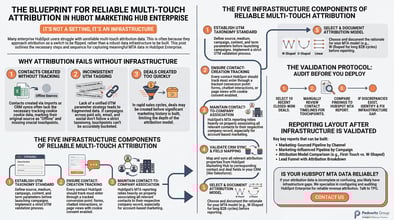
Nine decisions made in the first four to six weeks of the implementation determine whether the platform produces pipeline attribution data that holds up in a CFO conversation or produces activity data that holds up in a marketing team meeting.
Decision 1: Contact Creation Methodology
What it is: How contacts enter HubSpot determines whether they have original source data. Contacts created through tracked form submissions or page views have original source automatically populated. Contacts created through imports or CRM syncs have original source set to "offline sources" by default.
Why it affects pipeline reporting: First-touch attribution assigns credit to the channel that created the contact. If a significant percentage of contacts were created through imports, first-touch attribution will show "offline sources" as your top marketing channel.
The right decision: Define the preferred contact creation method before the implementation begins. For contacts that must be imported, define a custom property that documents the actual source and populate it during import.
Decision 2: UTM Taxonomy Structure and Enforcement
What it is: The parameter structure applied to every marketing link and the process that ensures it is applied consistently.
Why it affects pipeline reporting: Inconsistent UTM application means attribution data cannot be aggregated by channel. A LinkedIn campaign that ran under three different medium values appears as three separate channels in attribution reporting.
The right decision: Define the complete UTM taxonomy before the first campaign launches. Distribute the standard to every person who creates marketing links. Add a UTM verification step to every campaign launch checklist.
Decision 3: Contact-to-Company Association Rate Threshold
What it is: The minimum percentage of contacts that must be associated to a company record for account-level attribution reporting to be accurate.
Why it affects pipeline reporting: Account-level pipeline attribution in B2B requires contacts to be associated to companies. Contacts that are not associated to a company are invisible to account-level attribution.
The right decision: Set a threshold of 85% minimum contact-to-company association rate and establish a maintenance process to keep it there.
Decision 4: Lifecycle Stage Entry and Exit Criteria
What it is: The specific, written criteria that determine when a contact moves from one lifecycle stage to the next.
Why it affects pipeline reporting: Pipeline attribution reporting is structured around lifecycle stages. If lifecycle stage definitions are vague or inconsistently applied, the pipeline report produces numbers that nobody can explain or defend.
The right decision: Define each lifecycle stage with criteria specific enough that two different people would make the same stage determination for the same contact. Get written agreement from both sales and marketing leadership before configuring.
Decision 5: Deal Creation Trigger
What it is: The event or condition that triggers deal creation in HubSpot.
Why it affects pipeline reporting: The marketing touchpoints available for attribution are those that occurred before the deal was created. The earlier the deal creation trigger, the more complete the attribution history.
The right decision: Create deals at the earliest stage where a revenue outcome is plausible. For most B2B organizations, that is SQL or opportunity stage.
Decision 6: Attribution Model Selection
What it is: The mathematical model that determines how credit is distributed across the touchpoints in a contact's marketing history.
Why it affects pipeline reporting: Different attribution models produce different pipeline contribution numbers for the same set of marketing touchpoints.
The right decision: For enterprise B2B with sales cycles of 6 months or longer: W-shaped or full-path attribution. For mid-market B2B with sales cycles of 2 to 6 months: time-decay or linear attribution. For organizations with short sales cycles under 60 days: last-touch attribution is often sufficient. Document the selection and the rationale before presenting attribution data to leadership.
Decision 7: Marketing Hub to CRM Sync Field Scope
What it is: Which HubSpot Marketing Hub contact properties sync to CRM contact records.
Why it affects pipeline reporting: Pipeline reports in HubSpot pull from Marketing Hub data. Pipeline reports in CRM pull from CRM data. For these reports to be consistent, the attribution-relevant fields from Marketing Hub need to sync to CRM.
The right decision: Map every attribution-relevant field in the Marketing Hub to CRM sync configuration. Test the sync with a sample contact record that has known tracking data and verify the CRM contact record shows the expected values.
Decision 8: Custom Event Schema Scope
What it is: Which product behaviors or third-party system events are tracked as custom HubSpot behavioral events for Enterprise tier users.
Why it affects pipeline reporting: Custom behavioral events allow product usage signals to appear as marketing touchpoints in attribution reporting.
The right decision: Track the three to five product behaviors most strongly correlated with new purchase or expansion intent. Do not track every possible product event. More tracked events produce more data noise rather than more attribution clarity.
Decision 9: Reporting Permission Architecture
What it is: Who can create, modify, and share HubSpot reports and dashboards.
Why it affects pipeline reporting: Uncontrolled dashboard creation consistently produces a proliferation of conflicting pipeline reports. Leadership asks for the marketing pipeline number and receives three different answers from three different dashboards.
The right decision: Designate one marketing-sourced pipeline dashboard as the authoritative source of record. Restrict the ability to modify that dashboard to a named administrator. Configure reporting permissions in HubSpot's settings to enforce these access controls.
Frequently Asked Questions
What is the most common configuration decision that enterprise teams get wrong? Deal creation trigger. Enterprise organizations most commonly create deals too late in the sales process. By the time the deal is created, 80% of the marketing attribution history has accumulated on the contact record but is excluded from the attribution model because the deal did not exist when those touchpoints occurred.
How long after the implementation go-live before pipeline attribution data is reliable? Thirty days for a well-configured implementation. At day 90, with a full quarter of clean data, it is reliable enough for a CFO presentation.
Can we fix attribution problems in an existing HubSpot instance without disrupting live programs? Yes, with careful sequencing. UTM taxonomy fixes can be implemented in new campaigns without affecting historical data. Attribution model selection can be changed at any time because HubSpot calculates attribution retroactively based on stored touchpoint data.
The Pedowitz Group is a HubSpot Platinum Partner and 3x Marketo Partner of the Year and Eloqua Partner of the Year. If your pipeline attribution reporting is not producing the numbers your revenue model requires, a configuration audit identifies which of these nine decisions needs to be revisited. Talk to TPG.