Most lead scoring models fail because marketing scores what it can measure, not what predicts purchase intent. TPG has rebuilt lead scoring for dozens of companies over 19 years, and the pattern is consistent: models built by marketing, for marketing, produce MQLs that sales ignores. Here is how to build one that changes that.
Why Most Lead Scoring Models Break Down
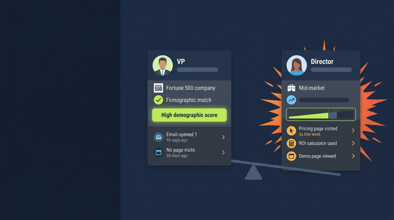
The average HubSpot instance scores leads on email opens, form fills, and page visits with no weighting for fit. A student who downloaded your ebook gets the same score as a VP of Marketing at a $50M SaaS company who visited your pricing page three times. Sales learns quickly not to trust the queue.
There are two structural problems. First, scoring reflects what HubSpot makes easy to capture, not what correlates with revenue. Second, there is no recalibration loop. The model gets built once and never updated.
Fix both problems and MQL-to-SQL conversion improves 30-45%. That is not a projection. That is what TPG sees in post-engagement reviews with clients who implement a calibrated fit + intent model.
Step 1: Build a Fit Score Before You Build a Behavior Score
Fit scoring answers one question: does this person's company match your ICP? Behavior scoring only matters if fit is present. Score fit first, gate behavior score behind it.
Demographic and Firmographic Fit Scoring
Assign points for signals that match your ICP. Below is a starting framework. Adjust thresholds to your specific ICP.
Company signals:
- Company size 100-500 employees: +15 pts
- Company size 501-2,000 employees: +20 pts
- Company size 2,001+ employees: +10 pts (often wrong fit for mid-market products)
- Industry match (your top 3 ICP industries): +15 pts each
- Technology stack match (HubSpot detects tech stack via company object): +10 pts
Contact signals:
- Job title VP or above: +20 pts
- Job title Director: +15 pts
- Job title Manager or Specialist in a qualifying function: +10 pts
- Email domain matches known ICP company: +5 pts
Negative fit signals:
- Personal email domain (Gmail, Yahoo): -30 pts
- Student email (.edu): -25 pts
- Competitor domain: -50 pts
- Company size under 10 employees: -20 pts
Set a minimum fit score threshold (TPG typically uses 25-30 pts) below which contacts never enter the behavioral scoring layer. This alone cuts noise from the MQL queue by 40-60%.
Using HubSpot Company Scoring Alongside Contact Scoring
HubSpot offers both contact-based scoring (the default) and company-based scoring, which requires Marketing Hub Professional or higher. For B2B with multiple stakeholders per account, you need both.
Use contact scoring to track individual engagement signals. Use company scoring to track account-level fit and multi-contact engagement patterns. A company where three contacts have visited your pricing page in the same week should surface differently than one contact with the same three visits.
Company scoring is underused. Most HubSpot instances only have contact score configured. That is a gap worth closing.
Step 2: Build the Behavioral Intent Score
Behavioral scoring should reflect buyer journey position, not just activity volume. A pricing page visit signals different intent than a blog post read. Weight accordingly.
High-Intent Behavioral Signals
| Action | Points |
|---|---|
| Pricing page visit | +20 |
| Demo request page visit (no conversion) | +15 |
| ROI calculator interaction | +15 |
| Case study download | +10 |
| Solution/product page visit (2+ pages) | +12 |
| Returning visitor within 7 days | +10 |
| Webinar registration (topic-relevant) | +8 |
| Video watch 75%+ completion | +8 |
Low-Intent and Noise Signals
| Action | Points |
|---|---|
| Blog post read | +2 |
| Homepage visit | +1 |
| Social link click | +2 |
| Webinar attendance (no follow-up action) | +3 |
The mistake most teams make is over-scoring blog reads and email opens. Those signal awareness, not intent. Weight them accordingly: 1-3 pts, not 10-15.
Score Decay
HubSpot supports score decay through workflow automation. Set up a monthly workflow that reduces scores for contacts who haven't engaged in 30 days. Contacts inactive for 60 days should have scores halved. Contacts inactive for 90+ days should return to their fit score baseline only.
Without score decay, your MQL queue fills with leads who were interested six months ago and have since moved on or made a decision elsewhere.
Step 3: Set the MQL Threshold Using Historical Data, Not Gut Feel
The most common scoring mistake is setting the MQL threshold at an arbitrary number (usually 100) without looking at what scores your actual closed customers carried when they converted.
The Right Way to Calibrate the Threshold
Pull a list of your last 50-100 closed-won customers from HubSpot. Look at the lead score they carried at the time of their first sales contact. Find the median. That is your starting MQL threshold.
If you do not have that data yet, start with a lower threshold (50-60 pts on a 100-pt scale), review every MQL with sales for 60 days, and recalibrate based on which ones converted to SQL.
For companies using HubSpot Marketing Hub Enterprise, predictive lead scoring is available as an alternative to manual scoring. Predictive scoring uses machine learning to analyze what characteristics your actual customers share and weight them automatically. It requires a minimum of 200 contacts who have become customers and is most accurate at 500+. For smaller databases, stick with manual scoring.
"The MQL threshold is a hypothesis. Treat it like one. Revisit it every 90 days until conversion rates stabilize."
Step 4: Build the Sales Feedback Loop
A scoring model without a feedback loop becomes stale within 90 days. Markets shift, buyer behavior changes, new content enters the mix. The model has to adapt.
How to Structure the Feedback Loop
Set up a weekly or bi-weekly 30-minute review with a sales rep (rotate if you have multiple). Pull the last week's MQLs and go through them together. For each one, sales rates quality: Good fit, Marginal, or Not a fit.
Track outcomes separately: MQL to SQL conversion rate by score range. If contacts scoring 60-70 convert at 5% and contacts scoring 90-100 convert at 8%, the model is directionally right but may need threshold adjustments. If contacts scoring 90-100 convert at 2% and contacts scoring 50-60 convert at 6%, your high-point actions are wrong.
Common feedback loop findings:
- Whitepaper downloads are over-scored for intent (behavior signals real, but intent to buy is weak)
- Pricing page visits are under-scored because they feel too obvious
- Job title scoring is off because actual buyers at the account are in different roles than expected
- Score decay is too aggressive, causing active contacts to fall below MQL threshold
Quarterly, export all contacts who became customers in the last 90 days and run a score analysis. What did their score look like at conversion? Adjust weights to bring more contacts like them above the MQL threshold earlier.
HubSpot Lead Scoring Build Checklist Build this in order: (1) Define ICP criteria in writing before touching HubSpot. (2) Configure fit scoring and test against 20 known good vs. 20 known bad contacts. (3) Add behavioral scoring and validate weighting against conversion data. (4) Set MQL threshold using closed-won analysis. (5) Configure score decay workflows. (6) Set up weekly sales feedback cadence. (7) Schedule 90-day model review.
HubSpot Configuration: Where to Build Each Layer
Contact scoring: HubSpot Settings > Properties > Contact Score. Uses HubSpot Score property by default. Can build custom score properties for separate fit and intent components if you want them tracked separately.
Company scoring: Settings > Properties > Company Score. Enable company-based scoring in Marketing Hub to use this feature.
Predictive lead scoring: Available in Marketing Hub Enterprise. Found in Contacts > Lead Scoring > Predictive Scoring. Requires minimum contact volume to activate.
Score decay workflows: Contacts > Workflows. Use date-based or last engagement triggers to reduce score properties on inactive contacts.
Frequently Asked Questions
How many points should a contact need to become an MQL? This depends entirely on your database and conversion history. TPG typically sees MQL thresholds set between 40-80 points for mid-market B2B companies, but the right number comes from analyzing what scores your actual closed customers carried at the time of first sales contact. Set a hypothesis, measure for 60-90 days, and recalibrate. Do not pick 100 because it is a round number.
Should I use HubSpot's predictive lead scoring or build a manual model? If you have fewer than 500 customers in HubSpot, build a manual model. Predictive scoring needs enough historical data to find patterns. Below that threshold, it will weight signals based on limited data and may produce worse results than a well-constructed manual model. Above 500 customers with consistent close data, predictive scoring is worth testing alongside your manual model.
How often should I recalibrate my lead scoring model? At a minimum, quarterly. When you launch new content, update pricing, or change your ICP definition, recalibrate immediately. The sales feedback loop should surface needed changes faster than a quarterly review. If sales is consistently flagging quality issues, do not wait for the quarterly calendar.
What is the difference between contact scoring and company scoring in HubSpot? Contact scoring tracks individual-level signals and demographics. Company scoring tracks account-level signals and is useful for identifying buying committees where multiple contacts at the same company are engaging. For B2B with multi-stakeholder deals, use both. Contact score alone misses accounts where three different people are researching your product from the same company.
Why does my lead scoring model work in HubSpot but sales still ignores MQLs? Usually one of three things: the threshold is too low and volume is too high, fit scoring is missing so non-ICP contacts are reaching MQL, or there is no feedback loop so sales has learned not to trust the model over time. Audit the last 30 MQLs against sales CRM notes. The pattern will be obvious within 20 records.
Can I score based on a contact's company's technology stack? Yes, indirectly. HubSpot's company object can capture technology data via integrations with Clearbit, ZoomInfo, or Apollo. Once enriched, you can create workflow-based scoring actions that add points to contacts when their associated company has specific technology properties. This requires HubSpot Operations Hub Professional or an enrichment integration.
The Pedowitz Group | pedowitzgroup.com | Revenue Marketing Experts Since 2007