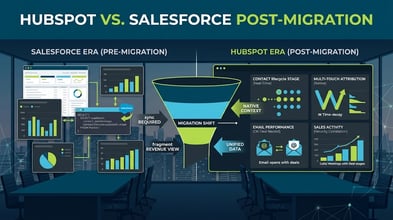
Most HubSpot CRM implementations fail to deliver the pipeline data they were supposed to produce. Not because HubSpot cannot do it. Because the implementation was configured for the platform instead of for the revenue model. The difference between those two approaches is the difference between a populated CRM and a revenue-accountable one.
This guide covers the 12 steps that separate an enterprise HubSpot CRM implementation that produces pipeline attribution data from one that produces a contact database with a HubSpot logo on it. Each step is in sequence. The sequence matters. Steps that are reordered or skipped create remediation projects that cost more time than the original step would have.
Before You Touch HubSpot: The Three Decisions That Determine Everything
Decision 1: What does the revenue model require from the CRM?
This question sounds obvious. It is not answered in most implementations. The revenue model determines the data model. The data model determines every configuration decision in HubSpot. If you are implementing HubSpot for a single-product company with a 30-day sales cycle and a two-person sales team, the correct configuration is different from an implementation for a multi-product enterprise with a 9-month sales cycle, 12 sales territories, and a buying committee averaging 7 stakeholders per deal.
Write down the answers to these questions before you open HubSpot: What is the ICP? What does the buying committee look like? How long is the sales cycle? How many pipeline stages exist between first contact and closed deal? What does a qualified lead look like, and who agreed to that definition? What pipeline reporting does the CMO need to produce, and on what cadence?
Decision 2: What does the attribution model need to be?
Decide the attribution methodology before implementing. First-touch, last-touch, and multi-touch attribution models require different infrastructure and produce different numbers. Switching attribution models after the implementation is live requires reconfiguring the infrastructure that was built for the original model, which typically means months of historical data that cannot be retroactively re-attributed.
For B2B companies with sales cycles longer than 60 days, multi-touch attribution produces more accurate pipeline contribution data than single-touch models. For companies with shorter cycles and simpler buying processes, first-touch or last-touch may be sufficient. Make the decision before configuration begins.
Decision 3: What is the MQL-to-SQL handoff agreement?
The handoff between marketing and sales must be agreed upon before the CRM is configured because the handoff agreement determines the lifecycle stage definitions, the lead scoring thresholds, the routing workflows, and the SLA enforcement logic. Configuring those elements without an agreed handoff definition produces a CRM that enforces a process neither function accepted.
Get the agreement in writing before the implementation starts. It does not need to be a formal SLA document. It needs to be a written description of what a qualified lead looks like, what happens when one is identified, and what sales is expected to do with it and in what timeframe.
The 12 Implementation Steps
Step 1: ICP and buyer committee mapping. Document the Ideal Customer Profile with firmographic, technographic, and behavioral criteria. Map the buying committee for enterprise deals: which personas are involved, what each one evaluates, and at what stage of the deal they typically engage. This mapping drives the contact property design and the account-based reporting structure.
Step 2: Data model design. Define every custom property the CRM needs, the object associations it requires, and the data types for each field. Properties created without a documented purpose accumulate in HubSpot and degrade data quality over time. Every property created during the implementation should have a name, a data type, a defined use case, and a named owner.
Step 3: Lifecycle stage definition. Define each lifecycle stage with specific entry criteria and exit criteria. The definition must be specific enough that a sales rep and a marketing operations manager would independently make the same determination about a contact's stage given the same set of facts. Vague stage definitions produce inconsistent stage assignment, which produces unreliable pipeline reporting.
Step 4: Deal pipeline configuration. Configure deal stages to mirror the actual sales process. Name stages using the language the sales team already uses. Configure required fields at each stage so that key deal data is captured before the deal progresses. Configure win/loss reason tracking from the first day of live operation, not as a later enhancement.
Step 5: Lead scoring model. Build the lead scoring model from the ICP and buying signal data defined in Step 1. Configure separate scoring dimensions for demographic fit and behavioral engagement. Set thresholds that reflect the entry criteria for each lifecycle stage established in Step 3. Document the scoring model so that any marketing operations manager can explain why a specific contact reached MQL threshold.
Step 6: Lead routing and assignment. Configure lead routing rules that match the territory and assignment logic agreed upon with sales leadership. Test the routing against sample records before go-live. Routing errors that surface in the first week of operation damage sales team trust in the new system faster than almost any other failure.
Step 7: Marketing Hub to CRM sync. Configure the bi-directional sync between Marketing Hub and CRM with field-level mapping documented for every property that needs to sync. Run test records through the sync and verify that attribution fields arrive in CRM with the correct values. Marketing Hub fields that do not sync correctly to CRM produce invisible attribution gaps.
Step 8: UTM taxonomy and tracking configuration. Define the UTM parameter structure that will be applied to every marketing link across every channel. Configure HubSpot tracking codes on all marketing properties. Distribute the UTM taxonomy standard to every person who creates marketing links before any campaigns launch.
Step 9: Attribution dashboard build. Build the marketing-sourced pipeline dashboard before any live data enters the system. Validate that it produces expected outputs against test data. A dashboard that is built after live data arrives may not be retroactively accurate for the data that preceded it.
Step 10: SLA workflow configuration. Build the MQL handoff workflow, the SQL acceptance and rejection routing, and the lead recycling automation. Connect these workflows to the lifecycle stage framework. Configure SLA enforcement alerts that surface missed follow-ups in the pipeline report rather than requiring manual tracking.
Step 11: Integration configuration and testing. Configure every integration identified in the initial dependency mapping. Test each integration with live data before go-live. An integration that was tested in sandbox but not against live data produces surprises in the first week of operation.
Step 12: Validation protocol and go-live. Run a structured validation protocol against defined success criteria before the instance goes live. Validate data associations, workflow triggers, attribution fields, and reporting outputs. Do not go live until the validation protocol passes. Schedule a 30-day hypercare period for daily monitoring after go-live.
The 5 Configuration Decisions That Most Affect Pipeline Reporting Quality
Contact-to-company association model. HubSpot associates contacts to companies. The association model you configure determines whether pipeline attribution reports can show marketing contribution at the account level. If contacts are not properly associated to companies, account-level attribution is impossible regardless of how well the rest of the CRM is configured.
Original source field management. HubSpot auto-populates original source and original source drill-down fields when a contact is created. These fields cannot be changed once set. If contacts are created through an import rather than through tracked form submissions, the original source field will show "offline sources" rather than the actual marketing channel. This has a permanent effect on first-touch attribution reporting. Plan contact creation methodology before importing any records.
Deal creation trigger. When deals are created determines what marketing touchpoints are available for attribution. Deals created immediately at MQL include the full pre-MQL engagement history in attribution. Deals created at SQL or later miss attribution touches that occurred between MQL and SQL conversion. Configure deal creation at the earliest stage where a revenue outcome is plausible given your sales process.
Multi-touch attribution model selection. HubSpot offers linear, U-shaped, W-shaped, full-path, and time-decay attribution models. The right model depends on sales cycle length and the typical number of touches in a buying journey. For enterprise B2B with sales cycles over 6 months, W-shaped or full-path attribution produces the most accurate picture of marketing contribution. Document the model choice and the rationale for it before presenting attribution data to leadership.
Reporting permission structure. HubSpot's reporting permissions determine who can build and modify dashboards. In enterprise implementations, uncontrolled dashboard creation produces a proliferation of conflicting pipeline reports that different teams use as their authoritative source. Configure reporting permissions so that the marketing-sourced pipeline dashboard that was validated during implementation is the authoritative report, and new dashboards require a defined approval process before being shared with leadership.
What to Measure in the First 90 Days
Day 1 to 30: Contact-to-company association rate for new records. MQL workflow trigger accuracy: are the right contacts hitting MQL threshold for the right reasons? Lead routing accuracy: are leads arriving at the correct sales rep.
Day 30 to 60: MQL-to-SQL conversion rate. Compare to pre-implementation baseline if one exists. SLA compliance rate: what percentage of MQLs are receiving sales follow-up within the defined SLA window.
Day 60 to 90: First full attribution report. Marketing-sourced pipeline for the post-implementation period. First-touch channel breakdown. Multi-touch attribution report if configured. This is the data that establishes the post-implementation baseline for all future pipeline attribution reporting.
Frequently Asked Questions
What is the most common reason enterprise HubSpot CRM implementations fail to produce pipeline attribution data? The most common cause is that the attribution infrastructure (UTM taxonomy, contact-to-company association model, Marketing Hub to CRM sync field mapping) was not configured before campaigns launched. When the first 60 days of campaign data accumulates without proper UTM tagging and contact association, that data cannot be retroactively attributed. The attribution gap is permanent for the data that preceded the infrastructure fix.
How many custom properties should an enterprise HubSpot implementation include? As few as are required by the revenue model. More is not better. Every custom property that does not have a documented use case and a named owner becomes data quality overhead. A well-designed enterprise implementation typically requires 20 to 40 custom contact properties, 10 to 20 custom company properties, and 10 to 20 custom deal properties. Implementations with more than 100 custom properties almost always have significant unused property debt.
Should we implement all HubSpot Hubs at once or start with CRM? Start with CRM and Marketing Hub together. The pipeline attribution that justifies the HubSpot investment requires both. Implementing CRM without Marketing Hub produces a contact database without attribution. Implementing Marketing Hub without CRM produces campaign data without pipeline context. The two Hubs in combination are the minimum viable implementation for pipeline accountability.
The Pedowitz Group has been implementing HubSpot at enterprise scale since 2007. If you want to scope a revenue-ready HubSpot CRM implementation, the right starting point is a 60-minute session where we map your revenue model to the configuration it requires. Talk to TPG.