The most common question before a HubSpot CRM implementation is "how long will this take?" The most common answer from vendors is a timeline that was designed to win the deal, not reflect the actual work required.
This guide gives you an honest answer. Implementation timelines by company size and complexity, what drives each phase, where most projects lose time, and what you can do to keep the timeline on track.
The Honest Answer: It Depends on Four Variables
Before any timeline estimate is meaningful, four variables need to be known.
Data complexity. The volume of records you are migrating, the quality of that data, and the number of custom objects or fields that need to map to HubSpot are the primary drivers of migration timeline. A clean 20,000-contact database with standard fields implements significantly faster than a 200,000-contact database with 40 custom fields, significant duplicates, and complex custom objects.
Integration requirements. A HubSpot implementation that only connects Marketing Hub to CRM implements faster than one that also needs to integrate a data enrichment platform, a sales engagement tool, a CPQ system, and a business intelligence platform. Each integration adds design, build, and test time.
Organizational alignment speed. The speed at which your internal stakeholders can agree on lifecycle stage definitions, lead scoring criteria, and SLA terms is frequently the largest variable in implementation timeline. Technical configuration can be paused. It cannot proceed without agreed-upon business definitions.
Scope of the revenue-ready requirement. An implementation scoped to populate HubSpot with your existing data takes less time than an implementation scoped to produce a marketing-sourced pipeline dashboard that the CMO can present to the CFO. The second scope is the right one. It takes longer.
Timeline by Company Size and Scenario
Mid-Market B2B, New HubSpot Implementation (no prior CRM or migrating from a simple CRM)
This is the fastest implementation scenario. Clean data, limited custom field requirements, one or two integrations, and a single sales team with consistent process.
Realistic timeline: 5 to 7 weeks.
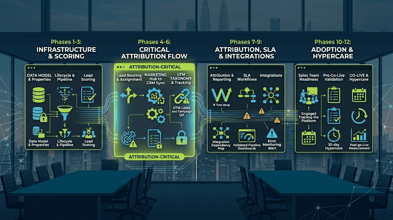
Week 1 to 2: Discovery, revenue model mapping, data model design, lifecycle stage alignment with sales. Week 2 to 4: Core configuration: properties, pipeline stages, lead scoring, routing. Week 3 to 5: Marketing Hub sync, UTM taxonomy, attribution dashboards, SLA workflows. Week 5 to 6: Integration configuration and testing. Week 6 to 7: Validation protocol, sales training, go-live. Week 7 to 9: 30-day hypercare monitoring.
Mid-Market B2B, Migration from Salesforce
Add the data audit and migration phases to the new implementation timeline.
Realistic timeline: 9 to 11 weeks.
Weeks 1 to 2: Salesforce data audit, migration scope definition. Weeks 2 to 4: HubSpot instance architecture, concurrent with data preparation in Salesforce. Weeks 4 to 6: Data migration in sequence: companies, contacts, deals, attribution history. Weeks 5 to 8: Integration configuration, workflow build, attribution dashboard build. Weeks 8 to 10: Validation, parallel running period, sales training. Week 10 to 11: Cutover and hypercare start.
Enterprise B2B, New Implementation (multiple sales teams, complex routing, enterprise data model)
Enterprise implementations have more stakeholders, more configuration decisions requiring alignment, more integration dependencies, and more rigorous validation requirements.
Realistic timeline: 10 to 14 weeks.
Weeks 1 to 3: Discovery across multiple stakeholder groups, revenue model mapping, enterprise data model design, lifecycle stage alignment across multiple sales segments. Weeks 3 to 6: Core configuration: enterprise-tier HubSpot setup, complex routing logic, multi-team pipeline configuration, custom objects if required. Weeks 5 to 9: Marketing Hub integration, multi-Hub configuration, integration builds for each dependency. Weeks 8 to 12: Validation protocol across all configuration components, sales team training by role and region. Weeks 12 to 14: Staged go-live by team or region, hypercare monitoring.
Enterprise B2B, Migration from Salesforce
The most complex and time-intensive scenario. Add the full migration workstream to the enterprise implementation timeline.
Realistic timeline: 14 to 20 weeks.
The migration adds the data audit, custom object architecture decisions, complex field mapping, attribution history migration, and an extended parallel running period to the enterprise implementation timeline. The parallel running period for enterprise migrations is typically 30 days, but organizational complexity and the number of Salesforce integrations being rebuilt can extend it.
Where Most Implementations Lose Time
Alignment delays on lifecycle stages and MQL criteria. The single most common cause of timeline slippage in enterprise implementations is the inability to reach written agreement on lifecycle stage definitions and MQL criteria within the first two weeks. When this alignment takes 4 to 6 weeks instead of 1 to 2, the entire timeline shifts right. Escalate alignment conversations to CMO and VP of Sales level immediately if they are not reaching resolution at the manager level.
Integration surprises. Integrations that were scoped based on a verbal description of the integration rather than a documented data flow consistently surface unexpected complexity during build. A 1-week integration estimate based on "it connects to Salesforce" becomes a 3-week build when the actual data flow includes custom objects, conditional logic, and a middleware layer nobody mentioned in the initial scoping conversation. Document every integration dependency in writing before the implementation begins.
Data quality remediation. Data audits that reveal higher-than-expected duplicate rates or contact-to-account association problems add remediation time to the pre-migration phase. This time cannot be eliminated by rushing. Remediating data quality problems in a live HubSpot environment is more expensive than remediating them in Salesforce before migration.
Approval cycles for configuration decisions. Enterprise implementations frequently require configuration decisions (routing logic, lifecycle stage criteria, attribution model selection) to go through approval cycles that were not scoped into the timeline. Build 2 to 3 business days of approval buffer into every phase of an enterprise implementation. If the approvals come faster, the timeline compresses. If they take longer, the buffer absorbs it.
What Compresses the Timeline
Pre-implementation alignment work. Teams that arrive at the implementation kickoff with written, agreed-upon lifecycle stage definitions, MQL criteria, and SLA terms compress the implementation timeline by 1 to 2 weeks. That pre-work is the highest-leverage investment a team can make before an implementation begins.
Clean data. A clean Salesforce or legacy CRM database with high contact-to-account association rates and low duplicate rates compresses the data audit and migration phases by 1 to 2 weeks. Teams that invest in data hygiene before the implementation begins recover that investment in compressed implementation timeline.
Named decision authority. Enterprise implementations that stall in approval cycles usually lack a named decision authority who can resolve configuration questions without going back to a committee. Name a single person with authority to approve implementation configuration decisions before the kickoff. Every decision that escalates to a committee adds 3 to 5 business days to the timeline.
What Does Not Compress the Timeline
Skipping the data audit. The data audit phase produces the information required to scope the migration correctly. Skipping it does not compress the timeline. It defers the data quality work to the post-go-live period, where it takes longer, costs more, and affects live programs.
Skipping sales alignment. Configuring lifecycle stages and lead routing without sales alignment produces a CRM that sales does not use. Rebuilding the configuration with sales alignment after go-live takes longer than doing it before.
Parallel workstreams that create dependencies. Some phases can run in parallel: instance architecture and data preparation can run concurrently. Integration configuration and SLA workflow build can run concurrently. Phases that depend on the output of a prior phase cannot be parallelized. Forcing them into parallel creates rework when the dependency surfaces.
Frequently Asked Questions
Can a HubSpot CRM implementation be done in 30 days? For a small mid-market company with a simple sales process, one or two integrations, and a clean database under 10,000 records, a 30-day implementation is possible if alignment is pre-established and decision-making is fast. For any enterprise scenario or any migration from a complex CRM, 30 days is not a realistic timeline for a revenue-ready implementation. A 30-day timeline for a complex implementation produces a populated CRM, not a pipeline attribution system.
Why do HubSpot implementation timelines from vendors vary so widely? Because different vendors are scoping different outcomes. A vendor scoping "get you live on HubSpot" can quote 3 to 4 weeks. A vendor scoping "get you to a marketing-sourced pipeline report your CFO will trust" will quote 8 to 12 weeks. Both timelines can be accurate for their respective scopes. The question is which scope produces the ROI the investment requires.
What should we do if our implementation is running behind schedule? First, identify whether the delay is in a technical phase or an alignment phase. Technical delays can often be compressed with additional resourcing. Alignment delays cannot be compressed. They can only be escalated. If the delay is in lifecycle stage or SLA alignment, escalate to CMO and VP of Sales level immediately. Every week of alignment delay extends go-live and delays the start of post-implementation attribution data accumulation.
The Pedowitz Group has been implementing HubSpot for enterprise and mid-market B2B organizations since 2007. If you are planning an implementation and want a realistic timeline based on your specific scope, a 60-minute scoping session will give you a timeline you can actually hold to. Talk to TPG.